 Kidney Tracker
Blood pressure and weight tracking with CKD
Two home readings, kept together and drawn as a line, so a pattern is easy to see and easy to share at your next appointment.
If you live with chronic kidney disease, your team may have asked you to keep a home record of your blood pressure and your weight. This post is about doing that well — logging the readings reliably and following them over time — and not about what the readings mean. Whether you take them, how often, and what any figure tells you is for your own team to decide. Kidney Tracker is the notebook; the clinical reading stays with them.
Why a home record is worth keeping tidy
A home reading is only as useful as the record around it. A single blood pressure number on a slip of paper, or a weight remembered but not written down, tells you very little on its own. What is usually more telling is the pattern over days and weeks — and a pattern is exactly what loose figures fail to show. Gaps creep in, slips of paper go missing, and by the next appointment the picture is patchy. Keeping it in one place, in the moment, is what keeps it whole.
Both readings, side by side
Kidney Tracker lets you record blood pressure as systolic and diastolic, with pulse too if you take it, and log your weight in a couple of taps. Each entry is timestamped, so a morning-and-evening rhythm is easy to keep if that is what you have been asked for. Because the two measures sit in the same app, you are not keeping a separate sheet for each — it is one tidy record.
Following the line
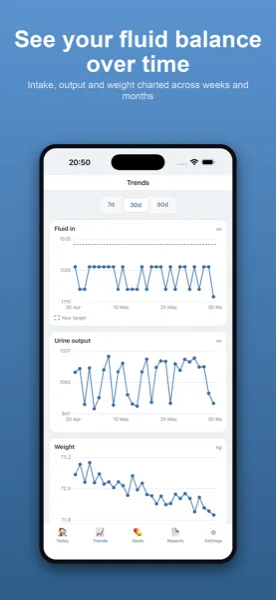
Both measures are plotted on their own charts, so instead of scanning a list you see the shape over time. A run of readings that looks different from last week, or a weight that has drifted, stands out far more clearly as a line — and is far easier to describe to your team. The boundary is firm: the chart draws what you entered. Kidney Tracker does not say whether a reading is high, low or normal, does not flag anything, and gives no advice of any kind.
Easy to keep, private to you
So the habit sticks, you can glance at your latest figures on a home-screen widget or an Apple Watch complication, and add a reading hands-free with Siri. Everything stays on your own iPhone — no account, nothing uploaded, and the developer never sees your data. When an appointment comes round, you can turn your records into a printable, shareable report generated on your device covering blood pressure and weight, and it goes only where you choose to send it.
The blood pressure log and weight tracking pages go into more detail on each. You may also like the posts on what people often track through the CKD stages and keeping a fluid and symptom diary with advanced CKD, or the CKD page.
Kidney Tracker is a personal record-keeping tool. It is not a medical device and does not provide medical advice — always follow your own clinical team.
FAQ
Common questions
Keep your home readings together
Kidney Tracker is in beta and free to try. Join through TestFlight — no account needed.
Join the beta on TestFlightiPhone only for now · Free during beta