 Kidney Tracker
Staying within a daily fluid restriction
Set your daily limit as a target, log every drink in seconds, and always know how much you have left for the day.
Keeping to a daily fluid restriction is mostly an exercise in counting — and counting in your head, across a whole day, is exactly the sort of thing a phone is good at. Kidney Tracker turns the limit your clinical team has asked you to keep to into a simple number on screen, then quietly adds up everything you drink so you never have to do the sums yourself.
Your limit becomes your target
When you set up the app you type in your own daily fluid target. This is a figure you decide on — the number your own team has given you — and the app treats it as the line you are working towards. Kidney Tracker never invents a limit or nudges it up or down; it simply holds the number you entered and measures the day against it. You can change it whenever your guidance changes.
Log every drink, see the running total
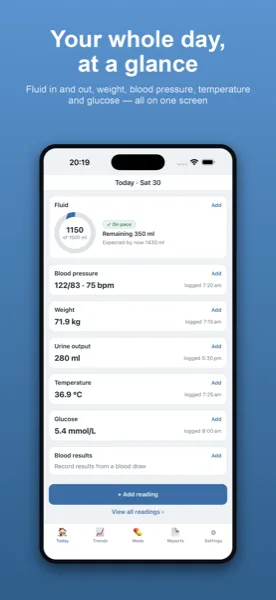
Each time you have something to drink, you log it in millilitres. To make that effortless you can save the sizes you use most often, so a mug of tea, a small glass of water or a can is a single tap rather than a fiddly entry. The Today screen keeps a live running total of everything you have had, and — the part most people care about — shows how much of your target is still left. Instead of wondering whether you can have another cup, you can see at a glance how much room remains.
Quick logging when you're busy
The moments you most want to record a drink are often the least convenient. A Home-Screen widget shows today's total and lets you check in without opening the app, an Apple Watch complication keeps the figure on your wrist, and Siri lets you add a drink by voice when your hands are full. The less friction there is, the more likely every drink actually gets counted — which is what makes the running total trustworthy.
A day that doesn't have to start at midnight
Restrictions are usually measured over a 24-hour window, and that window does not always begin at midnight. Kidney Tracker lets you pick a day-start hour, so the count rolls over at the time that suits you. If you want your day to line up with a clinic's 24-hour chart, you can set it to match.
Something to show at appointments
When you have a review coming up, you can turn your records into a clean, printable report and bring it along or share it. It is a tidy picture of how the days have gone, generated on your device — the app keeps no copy and the developer never sees it. Everything you enter stays on your iPhone, with no account and no tracking, so the only person looking at your numbers is you, until you choose to share them.
Kidney Tracker is a personal record-keeping tool. It is not a medical device and does not provide medical advice — always follow your own clinical team.
FAQ
Common questions
Related ways to use Kidney Tracker
Make your fluid limit easier to keep
Kidney Tracker is in beta and free to try. Join through TestFlight — no account needed.
Join the beta on TestFlightiPhone only for now · Free during beta