 Kidney Tracker
Managing a fluid restriction on haemodialysis
A daily limit is far easier to live with when you can see where you are at a glance, rather than carrying a running sum in your head all day.
If you are on haemodialysis, your team may have asked you to keep within a daily fluid limit. Sticking to it is one of the more demanding parts of day-to-day life, partly because it asks you to keep a running tally going from morning to night. This post is about making that tally easy to keep — logging what you drink and seeing the total against a limit you set. The limit itself, and everything clinical around it, comes from your own team; Kidney Tracker only does the counting.
Why a limit is hard to hold in your head
A fluid limit is not one decision but dozens of small ones spread across a day — a cup of tea here, a glass of water with a tablet there, a mouthful while cooking. Each is easy to forget within minutes, and by the afternoon it is genuinely hard to say how much has added up. People often end up guessing, either over-cautious and uncomfortable or surprised at how quickly the total climbed. The problem is not willpower; it is arithmetic you are expected to do from memory.
Log as you go, in millilitres
Kidney Tracker lets you record each drink in millilitres the moment you have it, so nothing relies on remembering later. You can save the amounts you use most — your usual mug, a particular glass — so a familiar drink is a single tap. Because logging takes a second or two, it is realistic to keep it up across a whole day, which is the only way a running total stays accurate.
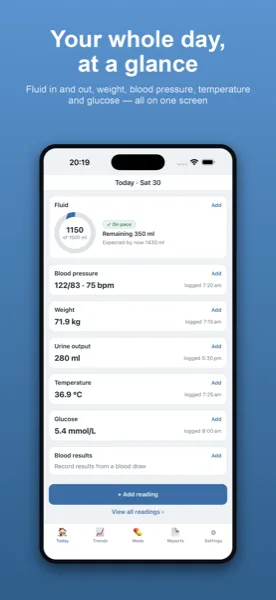
A running total against your own target
You enter your daily limit as a target — a number taken straight from your team's instructions — and the Today screen keeps a live running total of your intake against it. There is no adding up at the kitchen table and no end-of-day surprise; the figure is simply there whenever you glance. To be completely clear: you set the target, and the app totals against it. Kidney Tracker does not choose a limit, does not tell you that you are within or over it in any clinical sense, and gives no advice. It is a counter, not a coach.
Lining up with your dialysis day
Because a fluid day does not always begin at midnight, you can set a day-start hour so your totals reset on the schedule that suits your routine rather than the calendar. And so the count stays effortless, you can add a drink hands-free with Siri, keep your total in view with a home-screen widget, or glance at an Apple Watch complication without reaching for your phone.
Private, and ready to share if you want to
Everything stays on your own iPhone — there is no account, nothing is uploaded, and the developer never sees your data. If it helps to talk your intake through with your team, you can turn your records into a printable, shareable report generated on your device and bring it along. It goes only where you choose to send it.
The fluid restriction page covers setting a daily limit in more detail, and the haemodialysis page looks at logging around your sessions. You may also like the post on tracking interdialytic weight gain at home.
Kidney Tracker is a personal record-keeping tool. It is not a medical device and does not provide medical advice — always follow your own clinical team.
FAQ
Common questions
See your fluid total at a glance
Kidney Tracker is in beta and free to try. Join through TestFlight — no account needed.
Join the beta on TestFlightiPhone only for now · Free during beta